Color and HDR Notes: Best Practices and Gotchas
Published
Color and HDR: Best Practices, Gotchas and Error Recognition
Chris Lomont, with Claude Fable 5.2
What this article is. The symptom-first guide in a set of articles on color and HDR: what an error looks like, its likely cause, a quick test, the beliefs that cause most of the trouble, and the practices that prevent it.
Related articles. Expert notes: Color and HDR Notes . General-audience summary: Color and HDR Notes Summary . Lookup tables: Reference Tables . Companion topics: image resampling, dithering and quality metrics (summary , checklist ); sampling theory (summary , checklist ).
Contents
- 1. What it looks like, and what it usually is
- 2. Thirty things that are commonly believed and wrong
- 3. Practices that prevent most of it
- 4. Numeric and rounding traps
- 5. Tag, standard and tool traps
Each entry gives what you see, the likely cause, and a quick test.
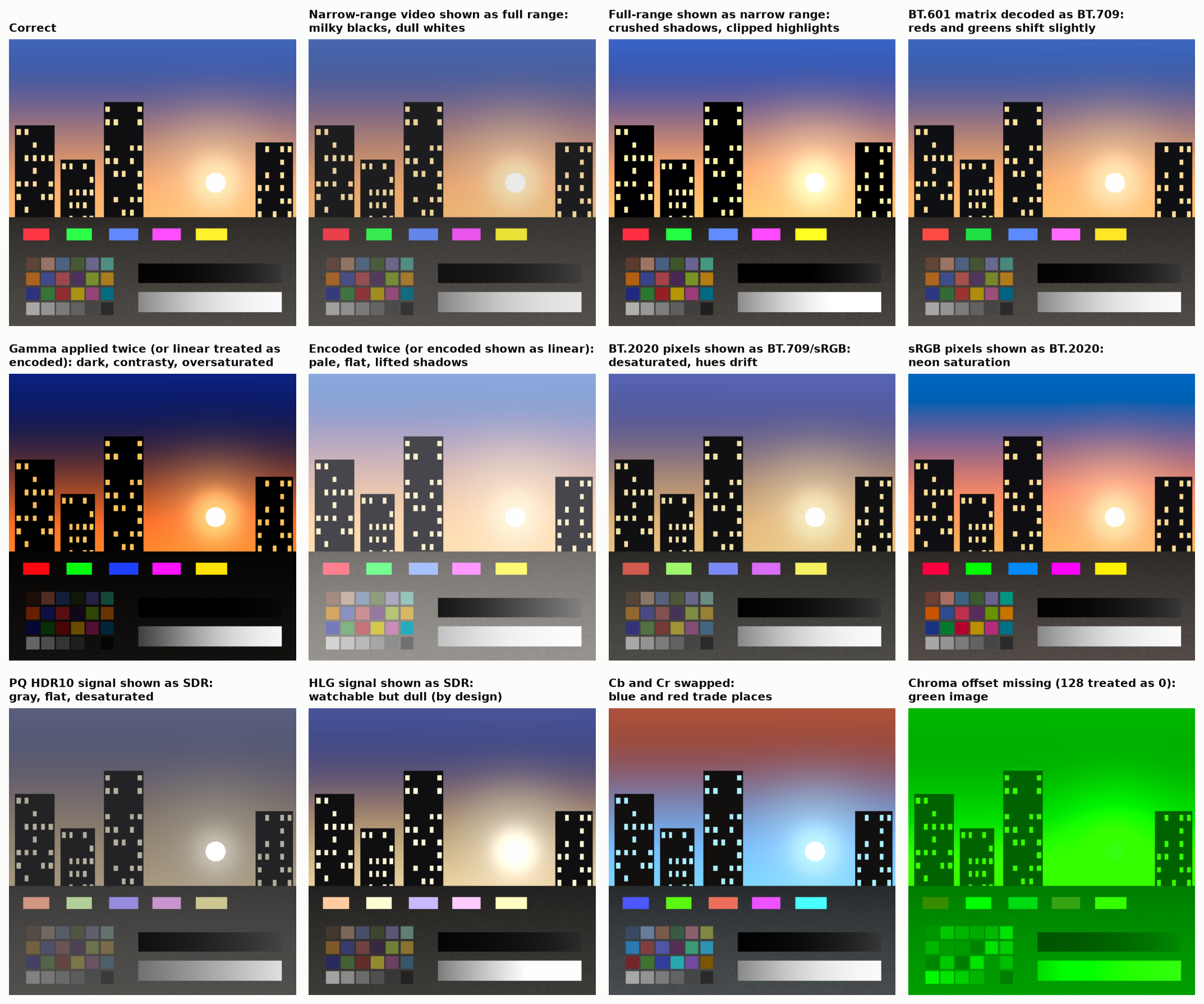
1. What it looks like, and what it usually is
| You see | Usual cause | Quick test |
|---|---|---|
| Milky blacks, dull whites, low contrast | Narrow-range (16–235) data shown as full range | Black measures code 16, white 235 |
| Crushed shadows, clipped highlights | Full-range data treated as narrow range, or range expanded twice | Histogram has gaps and piles at both ends |
| Gray, flat, desaturated, dim | PQ (HDR10) signal shown without its transfer function and gamut | Mid-gray sits near code 50% and faces look putty-colored |
| Slightly flat and desaturated but watchable | HLG shown as SDR; or BT.2020 SDR shown as BT.709 | Saturated reds look orange-brown |
| Desaturated, hue of greens and reds off | Wide-gamut pixels (P3, BT.2020) read as sRGB | A pure P3 red reads as dull red; profile missing or ignored |
| Neon, oversaturated, sunburned skin | sRGB pixels sent unmanaged to a wide-gamut panel, or tagged as P3/BT.2020 | Compare to a color-managed viewer |
| Too dark, too contrasty, oversaturated | Decoded twice (gamma applied to already-linear data) | A value of 50% becomes about 21% |
| Pale, lifted shadows, low contrast | Encoded twice, or linear data shown as if encoded | Mid-gray 50% becomes about 73% |
| Shadows a little too light or too dark, the rest fine | sRGB piecewise against pure 2.2; or BT.709 inverse OETF against BT.1886 | Compare codes 1–20 only |
| Skin slightly too red or too green, greens off | BT.601 and BT.709 matrices swapped | Color bars: green and red luma change; common on SD/HD rescale |
| Strong green image, or green and purple | Chroma offset missing (128 treated as 0), or zeroed chroma planes | Gray areas turn green |
| Blue and red swapped (orange sky, blue faces) | Cb/Cr swapped, or RGB/BGR order | Color bars |
| Colored fringes on one side of sharp colored edges | Chroma siting mismatch | Red text on blue, zoomed |
| Thin colored lines and small colored text dim and smeared | 4:2:0 or 4:2:2 chroma subsampling | Compare with 4:4:4; see cs12_chroma_subsampling.png |
| Steps or contours in skies and dark gradients | Too few bits for the transfer function (8-bit HDR, 10-bit clean graphics), lost dither, or processing after quantization | Contours move when you add a small offset before rounding |
| Blue and yellow gradients band, others do not | R11G11B10F: blue has one bit less | Switch the render target to half float |
| Dark saturated colors noisy or blocky next to bright ones | Shared-exponent format (RGB9E5, RGBE) | |
| Dark fringes where saturated colors meet (red against green) | Blending or resizing on encoded values | Redo in linear; see cs14_mixing_spaces.png |
| Dark or light halos at soft alpha edges | Premultiplied and straight alpha mixed, or premultiply done on encoded values | |
| Orange sun ring turns yellow, sky near the sun cyan, colors snap to white | Per-channel clipping of highlights | Reduce exposure 2 stops and compare hue |
| Highlights desaturate and drift in hue (red to orange, blue to cyan) | Per-channel tone curve | cs15_tonemap_hue_paths.png |
| Bright saturated lights look flat and poster-like | Luminance-only tone mapping with gamut clip | |
| Blue gradients turn purple | Interpolation or gamut mapping in CIELAB | Use Oklab or ICtCp |
| HDR photo looks fine in one app, plain SDR in another | Gain map stripped or not understood | File size dropped; no second image after the first JPEG end marker |
| Halos or ghost outlines around bright objects in an HDR photo | Gain map out of step with an edited, cropped or resized base | cs18_gain_maps.png |
| HDR photo changes look as screen brightness changes | Headroom-dependent gain-map weight; working as designed | |
| HDR video looks dim in a bright room | PQ is absolute and was graded for a dim room; display applies no ambient compensation | |
| SDR content washed out when the desktop is in HDR mode | SDR mapped with a different curve or white level than the SDR display used | |
| Two calibrated displays do not match in white | Observer metamerism between different emission spectra | Not fixable by 1931 colorimetry |
| Screenshot of HDR content looks wrong | Capture stored linear or PQ values without tags, or clipped at SDR white | |
| Colors change after saving a “lossless” file | Profile dropped, range flag changed, or premultiply round trip | Diff the pixels, then the metadata |
| One pixel in four differs by one code between two “identical” paths | One path encodes with round(255 f), the other with floor(256 f) |
Sweep a float ramp through both and count mismatches (expect 24.9%) |
| Tones creep toward black and white over many save or process cycles | Encoder and decoder use different rounding conventions | Run a mid-gray through 100 cycles |
| Bright or infinite values are black on one CPU and white on another | Out-of-range float converted to integer without a clamp | Encode +∞ on both |
| White is 1020 instead of 1023, or 248 instead of 255 | Bit depth changed by shifting on full-range data | Convert pure white |
| Edges of transparent sprites too dark | Color premultiplied by alpha on encoded values | A white pixel at 50% alpha should hold 50% of the light |
| Saturated blues and reds go dark, sometimes nearly black, after subsampling or chroma filtering in HDR | Chroma filtered in non-constant-luminance $Y'C_bC_r$ with PQ | One-pixel saturated blue line on white |
| An object changes hue as it gets dimmer | Wide-gamut color converted to a smaller gamut by per-channel clipping | Fade a saturated orange |
| HDR chroma about twice too strong in an analysis tool | PQ ICtCp matrix applied to an HLG signal | |
| HLG picture a factor of 12 off, or mid-gray wildly wrong | The two HLG normalizations mixed | Feed scene value 1.0 through the library |
| Image looks right in one viewer and washed out in another, file “tagged sRGB” | Range flag left at narrow, or several contradictory color chunks in a PNG | Dump the tags |
| Lab values of HDR content all dark, ΔE tolerances useless | CIELAB normalized to display peak instead of diffuse white | $L^{\ast}$ of the reference white should be 100 |
| Banding along one axis of a 3-D lookup table | Table stored as a 2-D strip and sampled with a single bilinear fetch | Blend two slices |
| Red and blue swapped after converting a lookup-table file | Axis order differs between formats | |
| Shadows crushed or banded only on phones | Shader running at low or medium precision | Count distinct outputs of a ramp at each precision |
2. Thirty things that are commonly believed and wrong
- “Gamma is for CRTs.” It is perceptual coding: it spends codes evenly in visual terms. Linear 8-bit is unusable for images.
- “sRGB is gamma 2.2.” The encoding is piecewise with a linear toe. Whether the display should be 2.2 is disputed.
- “BT.709 is gamma 2.2” or “the inverse of the 709 camera curve.” The display curve is BT.1886, a 2.4 power with a black offset.
- “Luma is luminance.” Luma is a weighted sum of encoded values. Part of the luminance is in the chroma channels.
- “YUV is a color space.” It is a family of encodings of some RGB space; without primaries, transfer, matrix and range it is undefined.
- “4:2:0 only loses color detail.” It loses luminance on saturated detail.
- “10-bit means HDR.” Bit depth, transfer function and gamut are independent. 10-bit SDR and 8-bit HDR both exist.
- “HDR means brighter.” It means more range: deeper shadows and small bright highlights. Average picture level is meant to stay near SDR.
- “PQ is absolute, so every display shows the same thing.” Displays tone-map above their peak and dim large bright areas.
- “HDR10 is 1000 nits.” HDR10 is a 10,000 cd/m² container. Mastering peaks of 1000 and 4000 are common.
- “203 nits is where white goes on every HDR display.” It is a signal level; HLG displays show it at different luminances by design.
- “Nits tell you how bright it looks.” Saturated colors look brighter than whites of the same luminance.
- “Wider gamut means more saturated pictures.” Correctly managed, in-gamut colors look the same; only colors outside the old gamut change.
- “P3 is P3.” DCI-P3, P3-D65 and Display P3 differ in white point and transfer function.
- “Covers 100% of BT.2020.” Check: coverage or ratio, xy or u′v′, at what luminance.
- “A gamut is a triangle.” It is a volume that narrows toward white, faster on displays with a white sub-pixel.
- “XYZ is device independent, so equal XYZ looks equal.” Only for the standard observer, at one adaptation state, in one surround.
- “The CIE 1931 observer was replaced.” It is still the basis of every imaging standard, known blue error and all.
- “N bits is N stops.” Only for linear integers, and only by the weakest definition.
- “This camera has 15 stops.” At what SNR, per pixel or normalized, measured by whom?
- “Film has 14 stops, digital has less.” No source for 14 was found. Kodak’s own figure for a current negative stock is at least 11 stops of exposure latitude, which is not a noise-based measure. Good sensors reach 13 to 14 stops by the engineering definition.
- “The eye sees 20-plus stops.” About 11 to 12 at one adaptation state; far more over time.
- “OLED has infinite contrast.” In a dark room with a black screen. In a lit room, reflections set the black.
- “Raw is the sensor data.” Phone raw files may be demosaiced, tone-mapped or multi-frame merged.
- “Lossless formats preserve the image.” Only if profile, range, alpha convention and bit depth survive every step.
- “Linear light is always right.” For physical operations, yes. Gradients, quantization, gamut mapping and sharpening are better in perceptual spaces.
- “Half float is overkill.” It is the smallest common format that is below the visibility threshold at every level with headroom for arithmetic.
- “A LUT is a look.” A LUT is a function with an undeclared input and output space. Applied to the wrong encoding it is noise.
- “Gain maps are just metadata.” They are a second image that can drift from, or contradict, the first.
- “6P projectors have six primaries.” Two RGB sets, one per eye.
3. Practices that prevent most of it
- Carry the tags (primaries, transfer, matrix, range) with every buffer, and assert on them at module boundaries. Treat “unspecified” as an error.
- Convert once, to a linear working space with a declared reference white, and encode once at the end.
- Keep a parameter for reference white. Do not hard-code 80, 100 or 203.
- Use half float or better for working buffers. Dither when reducing bit depth.
- Do tone mapping and gamut mapping together, not as independent steps.
- After any geometric or tonal edit to a gain-map image, regenerate or transform the map, or drop it deliberately.
- Test with synthetic patterns, not photographs: color bars in each range, a gray ramp with codes 0–20 expanded, one-pixel red/blue lines, a saturated-color exposure sweep, a P3-only red patch.
- Check the tail of the pipeline: what the operating system, browser or player does after your code is often the largest error.
- When reporting a number, attach its definition: stops (which quantity, which criterion), gamut (which diagram, coverage or ratio), ΔE (which formula, observer, white), nits (window size, duration).
- For color-critical matching across display technologies, verify by eye with more than one person.
- Use one rounding rule everywhere:
round(255 f)to encode,i/255to decode, with the clamp done in floating point. Never pairfloor(256 f)withi/255. - Change bit depth by exact scaling for full-range data and by shifting only for narrow range.
- Premultiply in linear light, and remember that 8-bit premultiplied color has lost precision that cannot be recovered.
- For CIELAB and ΔE on display light, normalize to diffuse white, and state the formula, observer and white with every number.
- Copy constants from the standard, not from slides or code, and keep a unit test with a published test vector for each transfer function and matrix.
- Insert graphics after tone mapping, at the same reference white as the program.
- When making a gain map, compute it against the base image as a decoder will reconstruct it, keep the default offsets, and regenerate it after any edit.
4. Numeric and rounding traps
floor(256 f)paired withi/255loses half a bit and drifts. It is the most common float-to-byte code in the wild. §7.4(a*b) >> 8is wrong for 72% of inputs. Uset = a*b + 128; (t + (t >> 8)) >> 8. §7.4v >> 8is the wrong way to make 8 bits from 16 on a quarter of all values. §7.4- Two correct-looking float-to-byte routines differ on 128 inputs because of single-precision rounding. Do the multiply in double. §7.4
- An 8-bit image survives a half float only with the right decode rule. §7.4
- Linear data needs four more bits than the encoded data it came from for a lossless round trip. §7.4
- Clamping noise at zero after black subtraction lifts and tints the shadows. §7.4
- RGBE files have two valid reader and writer pairings, and the most copied reference code mixes them, doubling the error.
- Formats without a sign bit cannot hold wide-gamut colors expressed in a smaller space. The negatives clip silently. §7.1
- What a half float can represent in the blacks depends on what 1.0 means. With 1.0 as 203 cd/m² the smallest normal value is coarser than 12-bit PQ’s darkest codes. §5.4
- Dither goes before the quantizer, in the space being quantized. Noise added afterwards does nothing for banding. §7.3
5. Tag, standard and tool traps
- Tagging a stream is not converting it. §5.3
- The range flag defaults to narrow. §12.1
- PQ landmarks are not round numbers: signal 0.5 is 92 cd/m², not 100. §5.2
- “HLG gamma is 1.2” is true at 1000 cd/m² only, and the formula changes outside 400 to 2000. §5.3
- The same tone curve applied twice compresses twice. Static tone mapping is not stable under repeated conversion between PQ and HLG; a hard clip is. §10.1
- Reference monitors should clip, not tone-map, and should show which pixels are out of range.
- “Peak nits” without a window size is meaningless. Some panels reach their peak only on a few percent of the screen. §4
- Gamut area depends on the diagram. P3 is 36% larger than sRGB in xy and 26% larger in u′v′. §3
- A gain map’s headroom depends on which white you divide by. §11.3
- A color temperature is reproducible to a kelvin or two at best, and should not be quoted at all far from the Planckian locus.
- Narrow-band spectra must not be interpolated. Interpolate the color-matching functions to the measured wavelengths instead. §2
- ICC version 2 and version 4 encode Lab differently, and ICC calibration has no HDR model. §12.1
Comments